
What Qwixl does
Marking, a personal tutor, and learning progression that adapts to every student - for teachers, SENCOs, students, and parents.
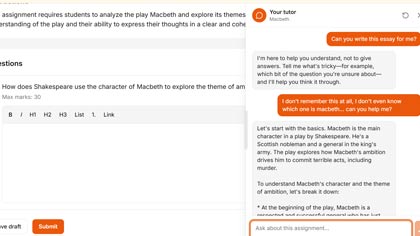
Personal tutor
A tutor that knows each student and grows with them.
Every student gets their own tutor. It learns how they approach problems, remembers what they've found difficult before, and adapts its support to their learning style. It guides - asking questions and suggesting steps - but never gives the answer away. Whether a student needs extra scaffolding or a stretch, the tutor adjusts.
Feedback that builds understanding
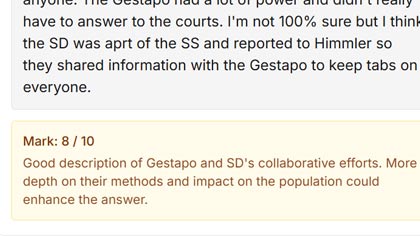
Detailed, question-level marking with comments and follow-up.
Students get clear feedback on every question - what they did well, what to focus on. Teachers can add notes, ratings, and inline comments. Spelling and grammar support comes with follow-up practice so students can improve, not just correct.
Early insight into learner needs
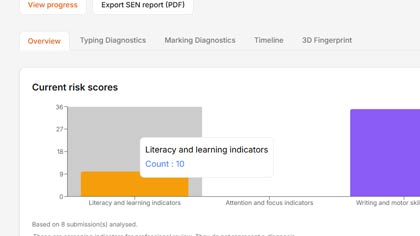
Spot who may need support - from how they work, not just scores.
Qwixl picks up on patterns in how students write - across keyboard, tablet, and phone - and surfaces insights for teachers and SENCOs. Over time, these patterns build a richer picture that helps schools identify learners who may benefit from extra support, long before they fall behind.
Progress that tells a story
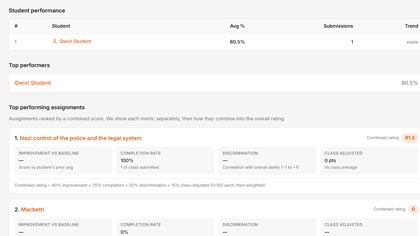
Learning progression across assignments, terms, and years.
One grade tells you very little. Qwixl tracks how students develop over time: trends in their work, how their writing changes, and where support is making a difference. Students, parents, teachers, and SENCOs each see the picture that matters to them.
And everything else you need
Flexible assignments
Writing replay
Original work
Practice and streaks
Reports and export
Works across devices
One tool for the whole class
Qwixl isn't separate software for SEN students and separate software for everyone else. It's one place where every learner works, and the support adapts quietly to each of them. Students who need extra help get it. Students who are ready for more get stretched. Nobody gets singled out, and the teacher sees the full picture.
New: Student Playground
Every assignment now opens with a focused workspace next to the tutor — somewhere students can read what their teacher shared, think their way in, and capture ideas as they work. It is built for independent learning, not answer-finding.
Explore
Teacher-curated resources for the assignment — videos, links, references — sit alongside the question so students can build context before they answer. No open web search; everything is teacher-approved.
Notebook
A private space for clips, quotes, and voice notes while they work. Nothing here is graded; it is the student's own thinking. The tutor can use what they have noted to give better guidance.
Personal tutor, expanded
The AI tutor knows the assignment context and the student's notes. It asks questions, suggests steps, and adapts to how the student is approaching the task — without ever writing the answer for them.
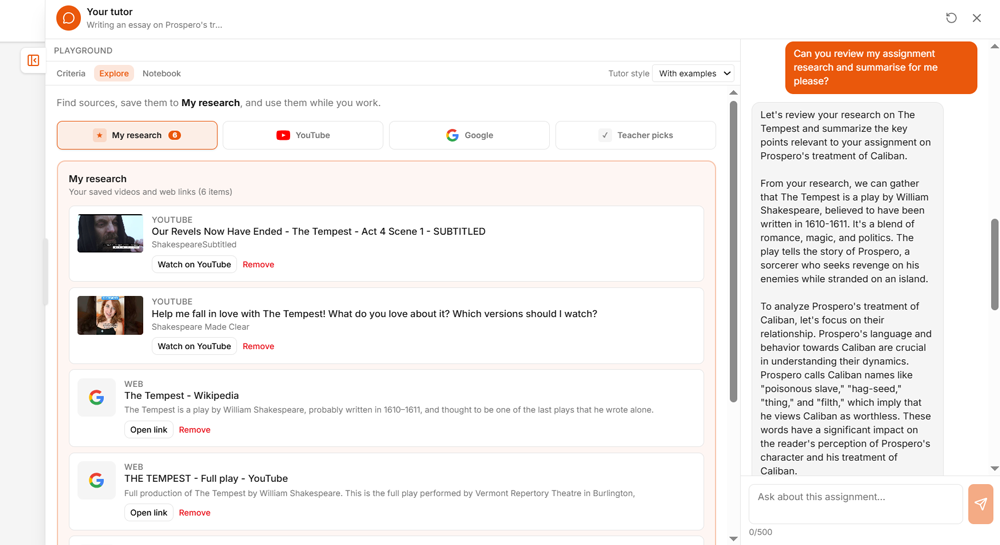
Student Playground
The Student Playground is a personal research space the student can use to gather further information about the assignment they're working on. Within the Qwixl framework, the teacher selects which YouTube channels the students can search. The student types in their search criteria and only videos from those pre-selected channels will appear. By clicking 'Add to Research', they can save the video to view at any time. The Google search is a standard search that can return results from across the web, with normal Google content restrictions in place.
Students can also view the marking criteria for the assignment so that they know where to best spend their time and they can make voice and text notes to add to their research. As this is research and not part of the assignment, its contents remains only visible to the student when they're viewing that particular assignment.
The Playground opens via a tab on the left-hand side of the AI Tutor chat panel and closes by clicking the same tab.