
Assistive technology for learning: What it is and how it helps
Devices, services and reasonable adjustments that help pupils access the curriculum and demonstrate what they know.
Assistive technology for learning: What it is and how it helps

Assistive technology (AT) is one of the most consequential and least understood areas of SEND support. Many educators and parents picture tablets or educational apps, but the reality is broader, more legally grounded in England, and more practically powerful than that. AT encompasses tools and services designed to remove barriers that prevent pupils with disabilities or learning difficulties from accessing the curriculum, participating in classroom activities, and demonstrating what they actually know. Plain-language definitions are in our glossary.
Key takeaways
| Point | Details |
|---|---|
| AT is more than gadgets | Assistive technology combines tools and services to help pupils overcome functional barriers to learning. |
| Selection is a team process | Effective AT comes from matching specific pupil needs with the right tools using a collaborative, ongoing process. |
| Training is essential | Success depends on training, awareness, and reducing stigma, not just buying technology. |
| UDL reduces stigma | Making accessibility options available to all learners helps everyone benefit from AT. |
| UK legal duty | Schools must take reasonable steps to avoid substantial disadvantage, including providing auxiliary aids where needed. |
What is assistive technology for learning?
In England, AT is commonly understood as devices, software or services that help learners participate in education. Schools have a duty under the Equality Act 2010 to take reasonable steps to avoid substantial disadvantage to disabled pupils, which can include auxiliary aids such as text-to-speech software or adapted materials. Through the SEND Code of Practice, schools must also not assume a diagnosis is required before identifying SEN or putting support in place.
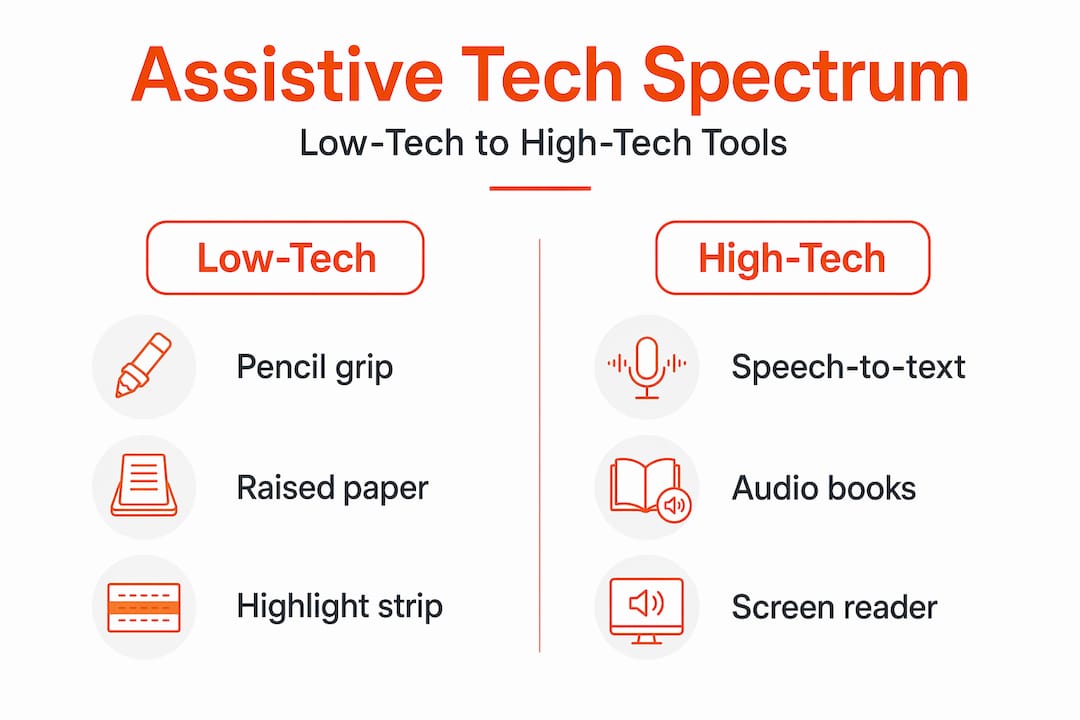
AT refers to tools used to increase, maintain, or improve the functional capabilities of pupils with disabilities or learning difficulties so they can access learning and participate in educational programmes. That definition covers an enormous range, from a simple pencil grip to sophisticated speech recognition software.
Critically, AT includes both devices and services. The device might be a screen reader or a word prediction program. The service is the training, setup, and ongoing support that makes that device actually useful. Separating the two is one of the most common mistakes schools and families make.
Assistive technology is not a reward for pupils who struggle. It is a practical bridge between a pupil's current capabilities and the learning environment's demands.
Key distinctions that help clarify what AT is and is not:
- AT is designed to address functional barriers, not just diagnosed conditions
- AT services include evaluation, training for staff and families, and technical support
- AT is not a substitute for high-quality instruction; it works alongside it
- AT decisions must be revisited as a pupil's needs and environments change
- Having SEN support or an EHCP does not remove the reasonable adjustments duty
Understanding AT in practice requires recognising that the goal is always access, not accommodation for its own sake. The question teams must answer is: what does this pupil need in order to engage with the same learning goals as their peers?
Types of assistive technology: From low-tech to high-tech

One useful framework is the spectrum from low-tech to high-tech. This challenges the assumption that more expensive or more digital always means more effective. The nasen assistive technology miniguide describes AT spanning low-tech to high-tech supports that can provide alternate pathways to the same curriculum goals.
| Category | Examples | Common learning areas supported |
|---|---|---|
| Low-tech | Pencil grips, raised-line paper, highlighters, reading rulers, fidget tools | Writing, reading, focus |
| Mid-tech | Talking calculators, portable word processors, audio recorders, visual timers | Maths, writing, organisation |
| High-tech | Text-to-speech software, speech-to-text tools, AAC devices, screen readers | Reading, writing, communication |
Each category has a role depending on the pupil's specific needs, the task at hand, and the environment. A pupil with dyslexia might benefit from a reading ruler (low-tech) at home and Microsoft Immersive Reader (high-tech) during school work. Around 10% of people in the UK are thought to be dyslexic (BDA).
Common AT tools by learning area include:
- Reading: Text-to-speech software, audiobooks, digital overlays, reading pens, RNIB Bookshare for accessible curriculum texts
- Writing: Word prediction software, speech-to-text tools, graphic organisers, dictation apps
- Maths: Talking calculators, virtual manipulatives, graph paper templates, number lines
- Organisation: Visual scheduling apps, digital planners, mind-mapping tools, colour-coded systems
- Communication: Augmentative and alternative communication (AAC) devices, picture-based communication boards
A pupil who struggles with written expression but has strong verbal reasoning can use speech-to-text to demonstrate knowledge that a pencil-and-paper test would never reveal. AT does not lower the bar; it changes the pathway to reaching it.
Many AT tools benefit pupils without formal diagnoses. A pupil experiencing anxiety around writing, or one who is an English language learner, may find that word prediction or text-to-speech tools reduce cognitive load and improve output quality. This is one reason why making AT broadly available, rather than restricting it to pupils with EHCPs, is gaining traction in forward-thinking schools.
How assistive technology is selected: The needs-matching process
Selecting the right AT is not a matter of browsing an app store. In practice, AT is implemented through a needs-matching process: teams identify the pupil's needs, the learning environments, the tasks to be completed, and the tools and services that fit. This process is formalised in a widely used framework called SETT.
The SETT framework, developed by Joy Zabala, organises AT decision-making around four interconnected areas:
- Student: What are the pupil's current functional abilities, challenges, and goals?
- Environments: Where does the pupil need to perform these tasks? What are the physical, social, and instructional conditions?
- Tasks: What specific tasks must the pupil complete to participate and make progress?
- Tools: Only after the first three areas are clearly understood should the team begin identifying tools and services.
Teams that skip directly to tools often purchase technology that sits unused because it does not fit the actual tasks or environments the pupil encounters. The process, not the product, determines whether AT succeeds.
The steps in a well-implemented AT process typically follow this order:
- Identify the specific functional problem the pupil is experiencing
- Gather data on the pupil's current performance across relevant tasks
- Consider the environments where support is needed
- Generate a range of possible AT solutions, from low-tech to high-tech
- Trial selected tools in real learning environments with adequate support
- Monitor outcomes using measurable data tied to support goals
- Adjust tools, training, or implementation based on evidence
Pro Tip: Treat AT like a service and a process, not a device purchase. A tool that works brilliantly in a one-on-one evaluation session may fail entirely in a noisy classroom without proper setup and staff training.
Barriers to effective assistive technology use
Even when schools have the right tools, AT frequently fails to make the impact it should. Practitioner guidance and research reviews commonly cite insufficient staff training, unclear awareness among teachers and families, and stigma about providing or using AT as key barriers.
The most commonly reported barriers to effective AT use include:
- Insufficient staff training: Teachers who have not been trained to integrate AT into their instruction cannot support pupils in using it effectively
- Lack of professional development: One-time training sessions are rarely sufficient; ongoing coaching and practice are needed
- Low family awareness: Parents who do not understand what AT is, why it has been provided, or how to support its use at home cannot reinforce the skills pupils are developing
- Stigma and social pressure: Pupils, particularly in secondary school, may refuse to use AT tools because they fear being singled out
- Inconsistent implementation: AT used only in resource rooms or only during certain subjects loses much of its potential benefit
- Technical and logistical obstacles: Devices that are not charged, software that is not updated, or tools locked behind IT restrictions can render even excellent AT inaccessible
Addressing awareness and stigma in schools requires deliberate effort at the classroom and school culture level. When AT is framed as cheating or as a sign of weakness, pupils will avoid using it even when it would significantly improve their performance and confidence.
Pro Tip: Normalise AT by making accessibility tools available to all pupils, not just those with EHCPs. When everyone in the class has the option to use text-to-speech or word prediction, the stigma associated with those tools diminishes considerably.
Reducing stigma and supporting all learners: AT and Universal Design for Learning
One important development is the relationship between AT and Universal Design for Learning (UDL). UDL calls for designing learning experiences with multiple means of representation, action and expression, and engagement, so that a wider range of learners can access the curriculum without requiring individual modifications after the fact.
AT is closely connected to UDL: when accessibility options are available more consistently, AT can reduce stigma by becoming part of a shared toolkit rather than a marker of difference.
When accessibility is built into the design of learning, assistive technology stops being a marker of difference and becomes part of a shared toolkit that every learner can draw on.
In practice, schools that embed captioning, audio options, digital text, and organisational scaffolds into their standard instructional materials create an environment where AT use is unremarkable. Pupils who need these tools most are no longer visibly separated from their peers.
What most guides miss about assistive technology for learning
Most guides on AT focus heavily on tool selection and legal compliance. They list apps, describe categories, and outline statutory requirements. What they rarely address is that technology alone almost never produces meaningful change in pupil outcomes.
AT is typically a service-plus-device model, and success depends on training, implementation fidelity, and ongoing monitoring to see whether the tool actually helps the pupil complete the specific tasks targeted. The Education Endowment Foundation places high-quality inclusive teaching at the heart of effective SEN provision; technology can be a useful support tool, but it should support evidence-informed pedagogy rather than replace it.
The most common failure pattern is not a bad tool choice. It is a good tool choice with no follow-through. A school installs a speech-to-text application on a pupil's device and considers the AT obligation met. The pupil has never been taught how to use it effectively. The teacher has not been trained to integrate it into writing instruction. The family does not know it exists. Six months later, the tool is unused and the pupil is still struggling.
Effective AT requires routines built into daily instruction, not reserved for testing accommodations or resource room sessions. The shift from "we provided the device" to "we are supporting the pupil's use of this tool across all their learning environments" is the difference between AT as a compliance checkbox and AT as a genuine intervention.
How Qwixl supports inclusive learning with assistive technology
For pupils working in Google Docs at home, Qwixl:Milo offers in-context support alongside the assistive tools many families already use. It surfaces four processing indicators (signals, not diagnoses) that can help families notice patterns worth discussing with school, especially while waiting for formal assessment. For teachers coordinating AT across a class, Qwixl:Homework supports assignment workflows and class-level insight. Neither tool diagnoses conditions or replaces statutory SEN processes. See also how to support students with dyslexia in the classroom.
Frequently asked questions
What qualifies as assistive technology for learning?
Any tool or service that helps a pupil with disabilities or learning difficulties access educational content and participate in school counts as assistive technology, including both physical devices and software systems.
Is assistive technology only for pupils with diagnosed disabilities?
No. AT tools can benefit any learner facing barriers with traditional instruction, and the UDL framework encourages making accessibility options available broadly to reduce stigma and broaden access.
How do schools decide which assistive technology to provide?
Schools use a team-based needs-matching process that considers the pupil's functional needs, learning environments, and specific tasks before identifying tools and services, often using structured frameworks like SETT.
What is a common reason assistive technology fails in practice?
Lack of staff training, insufficient family awareness, and absence of ongoing support are the most frequently cited reasons AT tools fail to produce the outcomes they are capable of delivering.
Sources and further reading
- EHRC, Reasonable Adjustments for Disabled Pupils
- nasen, Assistive Technology miniguide
- EEF, SEND in Mainstream Schools
- RNIB Bookshare