
Digital tools for organising school assignments in 2026
Homework for teacher workflows; Milo for in-doc pupil support, not a replacement planner.
Digital Tools for Organizing School Assignments in 2026

Digital tools organizing school assignments are software applications and platforms designed to help pupils, parents, and educators manage, track, and complete academic tasks with measurable efficiency. The category spans calendar apps, task managers, note-taking platforms, cloud storage systems, and AI-powered learning management systems (LMS). Tools like Google Classroom, Trello, Todoist, and Microsoft OneNote each address a distinct organizational need, and combining multiple interoperable tools consistently outperforms relying on any single application. This guide identifies the strongest options available in 2026 and explains how to build a system that works across every role in the academic environment.
1. What features make the best digital tools for school organization?
The most effective digital assignment management tools share a core set of features that address the full lifecycle of an academic task, from initial scheduling to final submission. Understanding these features before choosing a platform prevents the common mistake of adopting a tool that handles one stage well but creates friction everywhere else.
The features that matter most include:
- Calendar integration: Deadline visibility across weeks and months reduces last-minute crises. Google Calendar and Apple Calendar both sync with major task managers.
- Task and checklist management: Breaking assignments into subtasks with progress indicators keeps complex projects moving. Trello boards and Todoist projects both support this.
- Multimedia note-taking: Class content increasingly includes audio, video, and images. OneNote and Notion both accept mixed-media input natively.
- Cloud storage with folder structure: Organizing files by subject, semester, and assignment type prevents the document chaos that derails submission workflows.
- Collaboration features: Group projects require shared editing, comment threads, and version history. Google Drive and Notion both handle this without requiring separate communication tools.
- AI-assisted task creation: Emerging platforms now generate task lists from natural language input, summarize progress, and draft assignment prompts automatically.
Pro Tip: No single app handles all six functions equally well. Build a stack of two or three specialized tools rather than forcing one platform to do everything.
2. Top apps for organizing school assignments in 2026
The strongest tools available this year each occupy a specific niche within the broader assignment management workflow.
Google Classroom with Gemini AI is the most widely adopted LMS in K-12 education. Google Classroom now supports audio and video attachments alongside AI features including drafting assignments and summarizing pupil progress with Gemini. This reduces the administrative burden on educators while giving pupils clearer, faster feedback on their work.
Trello, Todoist, and Asana serve the task management layer. Trello's visual board system maps well to assignment stages (to-do, in progress, submitted). Todoist offers priority flags and recurring task scheduling, which suits pupils managing multiple courses simultaneously. Asana scales better for educators coordinating across departments or grade levels.
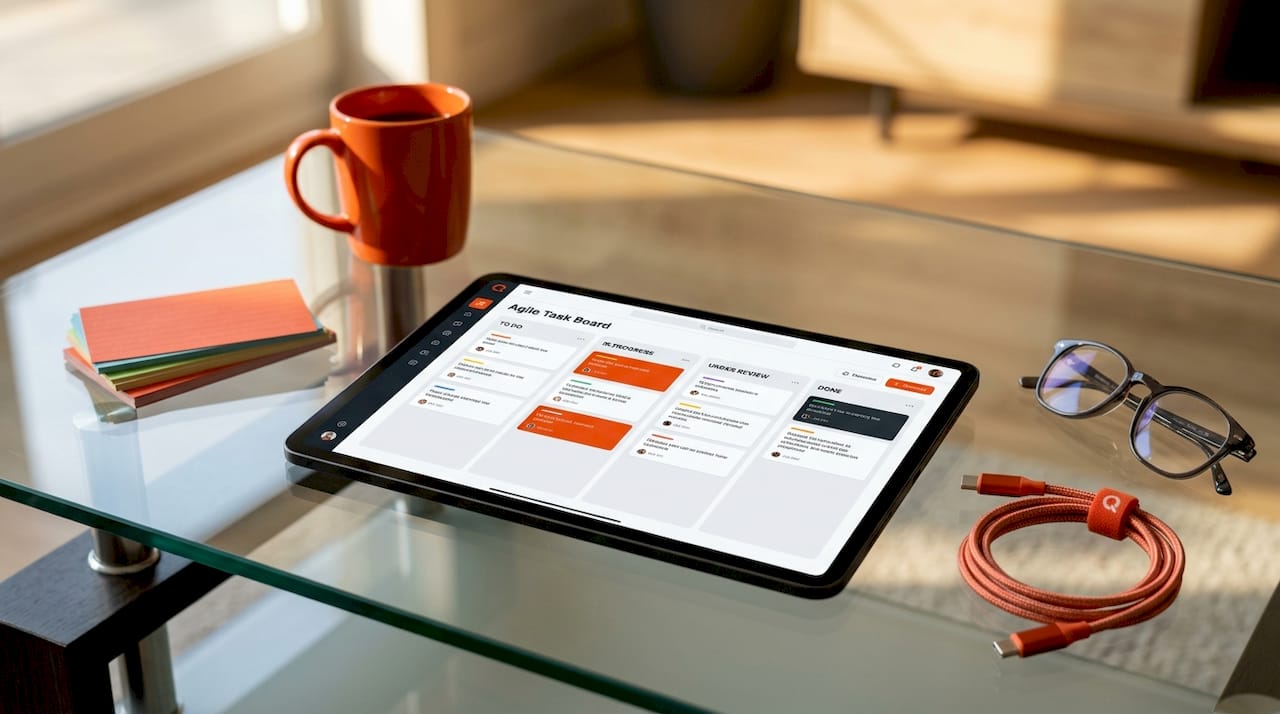
OneNote, Notion, and Evernote cover note-taking and content organization. OneNote integrates directly into Microsoft 365 environments, making it the natural choice for schools already using Teams. Notion's database features allow pupils to link notes to specific assignments and deadlines. Evernote remains strong for web clipping and research aggregation.
Google Drive and Dropbox provide the cloud storage foundation. Organizing Drive folders by subject and then by assignment type, with separate subfolders for drafts and final submissions, prevents file confusion at grading time.
T0ggles represents a newer category of pupil-specific planners. T0ggles offers multi-project boards that track assignments from “assigned” to “submitted,” with calendar syncing and AI-generated task creation from natural language input, priced at approximately $5 per user per month.
Pro Tip: Pupils benefit most from Todoist or T0ggles for personal tracking. Educators need platforms with grading workflows and class-wide visibility, such as Google Classroom or T0ggles for teachers. Parents are best served by tools that surface deadline summaries without requiring deep platform access.
3. How to integrate multiple tools into one assignment management system
Using digital tools to organize schoolwork effectively requires connecting separate applications so that information flows without manual duplication. The goal is a system where a new assignment entered in one place automatically surfaces in the pupil's calendar, task list, and file storage.
A practical workflow for pupils combines four layers. The calendar layer (Google Calendar or Apple Calendar) holds all deadlines and exam dates. The task manager layer (Todoist or T0ggles) breaks each assignment into subtasks with due dates that sync back to the calendar. The note-taking layer (Notion or OneNote) stores class content, research, and draft material linked to the relevant task. The cloud storage layer (Google Drive) holds final documents organized into subject folders with clear naming conventions.
Separating assignment materials into three distinct digital zones, specifically the prompt and rubric, the pupil work in progress, and the final submission, reduces confusion and simplifies grading. This three-zone structure works inside Google Drive folder permissions or within any LMS that supports separate submission states.
Educators building school-wide systems should account for platform-specific integration differences, particularly in LMS environments where API behaviors vary. For example, Schoology ignores PATCH updates on submission state fields, which affects any automation built around tracking submission status. Planning for these quirks before deployment prevents data sync errors at scale.
| Tool type | Primary function | Integration ease | Data sync reliability |
|---|---|---|---|
| Google Classroom | Assignment distribution and grading | High | High |
| Trello / Todoist | Task tracking and subtask management | Medium | Medium |
| Notion / OneNote | Note-taking and content organization | Medium | High |
| Google Drive | File storage and submission management | High | High |
| T0ggles | Pupil planner with AI task creation | Medium | Medium |
Pro Tip: Microsoft 365 schools can use Power Apps with SharePoint to build custom assignment portals with automated reminders and submission workflows, without purchasing additional third-party software.
4. What are the latest AI-powered updates enhancing assignment organization?
AI integration inside familiar educational platforms is the most significant development in digital assignment management in 2026. These updates reduce manual work for both educators and pupils while keeping AI outputs grounded in actual curriculum content rather than generic information.
The key developments this year include:
- Google Classroom and Gemini AI: Educators can now draft assignment prompts, generate rubrics, and receive AI-summarized progress reports on pupil submissions. Gemini AI saves time for educators and provides pupils with more consistent, timely feedback.
- PowerSchool Schoology and NotebookLM: Schoology's Gemini LTI integration allows direct import of course materials into Google's NotebookLM without manual uploads, enabling AI-generated study aids grounded specifically in course content.
- T0ggles AI task creation: Pupils can describe an assignment in plain language and the platform generates a structured task list with suggested deadlines and subtasks automatically.
AI tools integrated into familiar classroom platforms like Google Classroom enhance assignment management by grounding outputs directly in curriculum content, improving relevance and reducing generic information noise.
The practical implication of the Schoology and NotebookLM integration is significant. Pupils no longer need to manually upload syllabi or reading lists to generate accurate study guides. The AI draws from the actual materials their teacher has assigned, which means the summaries and practice questions reflect the specific content being assessed rather than a generalized version of the topic.
5. What digital tools work best for pupils, parents, and educators?
The right tool depends entirely on the user's role in the academic process. A platform that works well for a teacher managing 120 pupils across five classes creates unnecessary complexity for a parent who simply needs to know when the next major assignment is due.
For pupils, the priority is personal task tracking with deadline reminders and note integration. The most effective combination is a task manager like Todoist or T0ggles paired with a note-taking app like Notion or OneNote and a shared calendar. Qwixl:Milo supports pupils working in Google Docs with in-context scaffolding, while Qwixl:Homework helps teachers manage assignments, marking and feedback at class level.
For parents, the most useful tools are those that surface assignment deadlines and completion status without requiring active platform management. Google Classroom's guardian email summaries provide weekly or daily digest updates. T0ggles allows parents to view a pupil's board without editing access. The key need is visibility, not control.
For educators, the requirements are more complex and include:
- Assignment distribution with clear submission workflows
- Grading tools with rubric support and feedback templates
- Progress analytics across individual pupils and whole classes
- Calendar integration for planning assessment schedules
- Collaboration features for co-teaching or department-level planning
Teacher-facing platforms like T0ggles provide class management features with grading deadlines, subtasks, dependencies, and Google Calendar integration including AI task creation, which supports complex classroom assignment management with standard alignment and progress tracking. Educators looking for deeper insight into how digital tools support formative feedback will find that the most effective platforms close the loop between assignment distribution and evidence-based assessment.
Key takeaways
The most effective approach to organizing school assignments digitally combines a task manager, a calendar, a note-taking app, and cloud storage, each serving a distinct function within a connected workflow.
| Point | Details |
|---|---|
| Use a multi-tool stack | No single app covers all assignment management needs equally well across scheduling, tracking, and storage. |
| Apply the three-zone method | Separate prompts, drafts, and final submissions into distinct digital folders to reduce errors and simplify grading. |
| Leverage AI where it's grounded | AI features inside Google Classroom and Schoology work best because outputs are tied to actual course content. |
| Match tools to user roles | Pupils need personal trackers; educators need class-wide analytics; parents need deadline visibility without platform complexity. |
| Plan for LMS integration quirks | Platform-specific API behaviors, such as Schoology's handling of submission state fields, affect automation reliability. |
Why the “best app” question misses the point
The most common mistake I see when educators and pupils approach digital assignment organization is treating it as a search for one perfect tool. That framing leads to months of app-switching and the persistent feeling that the right solution is always one download away.
The reality is that the best apps for school organization are not competitors. They are layers. A calendar is not competing with a task manager. A note-taking app is not trying to replace cloud storage. Each tool in a well-designed stack does one thing well and hands off to the next. The friction disappears not when you find the perfect app but when the connections between your tools stop requiring manual effort.
I am also cautious about AI features that operate outside the curriculum. Generic AI study tools can generate plausible-sounding content that has no relationship to what a pupil's teacher actually assigned. The Schoology and NotebookLM integration matters precisely because it eliminates that risk. The AI reads the same materials the pupil is supposed to read. That specificity is the difference between a useful tool and a distraction dressed up as productivity.
The other factor that most guides understate is consistency. A system used imperfectly every day outperforms a perfect system used twice a week. The goal is not optimization. It is habit. Choose tools that fit naturally into the moments when pupils actually sit down to work, and build the workflow around those moments rather than around theoretical best practices.
How Qwixl supports smarter assignment organization
Qwixl is built for the moments when standard assignment tools are not enough. Qwixl:Homework combines AI marking, personalized tutoring features, and class-level pattern visibility tools in a single platform designed for teachers, SENCOs, and pupils who need more than a task list. The platform captures signals from writing patterns and engagement to surface learning behaviors that standard LMS analytics miss entirely. For schools managing diverse cognitive needs alongside standard assignment workflows, Qwixl provides the organizational and diagnostic depth that generic tools cannot. Explore the full Homework feature set to see how AI-assisted feedback and progress tracking work together in practice.
FAQ
What are the best digital tools for organizing school assignments?
The strongest combination for most pupils is a task manager like Todoist or T0ggles, a note-taking app like Notion or OneNote, and Google Drive for file storage, all synced to a shared calendar. Each tool type covers a distinct organizational need, and using them together produces better results than relying on any single platform.
How does AI improve digital assignment management?
AI features inside platforms like Google Classroom and PowerSchool Schoology generate assignment drafts, summarize pupil progress, and create study aids grounded in actual course materials. Gemini AI in Google Classroom specifically reduces the time educators spend on administrative tasks while improving feedback consistency for pupils.
How should pupils organize homework digitally?
Pupils should separate assignment materials into three zones: the original prompt and rubric, the work in progress, and the final submission. This three-zone structure, applied inside Google Drive or any LMS with folder permissions, reduces file confusion and makes the submission process significantly more reliable.
What tools help parents monitor school assignments?
Google Classroom's guardian email summaries deliver daily or weekly digest updates on assignment activity without requiring parents to log into the platform. T0ggles also allows read-only parent access to a pupil's assignment board, providing deadline visibility without disrupting the pupil's workflow.
Are there free tools for tracking school tasks digitally?
Google Classroom, Google Drive, Google Calendar, and Trello all offer free tiers with sufficient functionality for most pupils and educators. Todoist's free plan covers basic task management, while T0ggles offers a paid tier at approximately $5 per user per month for pupils who need AI task creation and multi-project boards.
Sources and further reading
- SEND Code of Practice: 0 to 25 years (England)
- EHRC, Reasonable Adjustments for Disabled Pupils
- EEF SEND in Mainstream Schools